


How to create an AI bot in Telegram
Learn how to create an AI chatbot for Telegram with our easy-to-follow guide. Ideal for users who are interested in exploring the realm of bot development without coding.



Save yourself the work of writing custom integrations for Google Drive and Telegram and use n8n instead. Build adaptable and scalable Data & Storage, Communication, and HITL workflows that work with your technology stack. All within a building experience you will love.
In n8n, click the "Add workflow" button in the Workflows tab to create a new workflow. Add the starting point – a trigger on when your workflow should run: an app event, a schedule, a webhook call, another workflow, an AI chat, or a manual trigger. Sometimes, the HTTP Request node might already serve as your starting point.

You can find Google Drive and Telegram in the nodes panel. Drag them onto your workflow canvas, selecting their actions. Click each node, choose a credential, and authenticate to grant n8n access. Configure Google Drive and Telegram nodes one by one: input data on the left, parameters in the middle, and output data on the right.

A connection establishes a link between Google Drive and Telegram (or vice versa) to route data through the workflow. Data flows from the output of one node to the input of another. You can have single or multiple connections for each node.

Use n8n's core nodes such as If, Split Out, Merge, and others to transform and manipulate data. Write custom JavaScript or Python in the Code node and run it as a step in your workflow. Connect Google Drive and Telegram with any of n8n’s 1000+ integrations, and incorporate advanced AI logic into your workflows.

Save and run the workflow to see if everything works as expected. Based on your configuration, data should flow from Google Drive to Telegram or vice versa. Easily debug your workflow: you can check past executions to isolate and fix the mistake. Once you've tested everything, make sure to save your workflow and activate it.

🤖 AI-Powered RAG Chatbot with Google Drive Integration
This workflow creates a powerful RAG (Retrieval-Augmented Generation) chatbot that can process, store, and interact with documents from Google Drive using Qdrant vector storage and Google's Gemini AI.
How It Works
Document Processing & Storage 📚
Retrieves documents from a specified Google Drive folder
Processes and splits documents into manageable chunks
Extracts metadata using AI for enhanced search capabilities
Stores document vectors in Qdrant for efficient retrieval
Intelligent Chat Interface 💬
Provides a conversational interface powered by Google Gemini
Uses RAG to retrieve relevant context from stored documents
Maintains chat history in Google Docs for reference
Delivers accurate, context-aware responses
Vector Store Management 🗄️
Features secure delete operations with human verification
Includes Telegram notifications for important operations
Maintains data integrity with proper version control
Supports batch processing of documents
Setup Steps
Configure API Credentials:
Set up Google Drive & Docs access
Configure Gemini AI API
Set up Qdrant vector store connection
Add Telegram bot for notifications
Add OpenAI Api Key to the 'Delete Qdrant Points by File ID' node
Configure Document Sources:
Set Google Drive folder ID
Define Qdrant collection name
Set up document processing parameters
Test and Deploy:
Verify document processing
Test chat functionality
Confirm vector store operations
Check notification system
This workflow is ideal for organizations needing to create intelligent chatbots that can access and understand large document repositories while maintaining context and providing accurate responses through RAG technology.
Nodes used in this workflow


Create custom Google Drive and Telegram workflows by choosing triggers and actions. Nodes come with global operations and settings, as well as app-specific parameters that can be configured. You can also use the HTTP Request node to query data from any app or service with a REST API.






Learn how to create an AI chatbot for Telegram with our easy-to-follow guide. Ideal for users who are interested in exploring the realm of bot development without coding.

Learn how to build a multilingual bot for Telegram with a few lines of JavaScript code, a NocoDB database, and conditional logic in an automated workflow.

Leverage the power of automation and machine learning to enable kinder online discussions.

Want to power up your online business and win back time? Discover how no-code workflow automation can help!
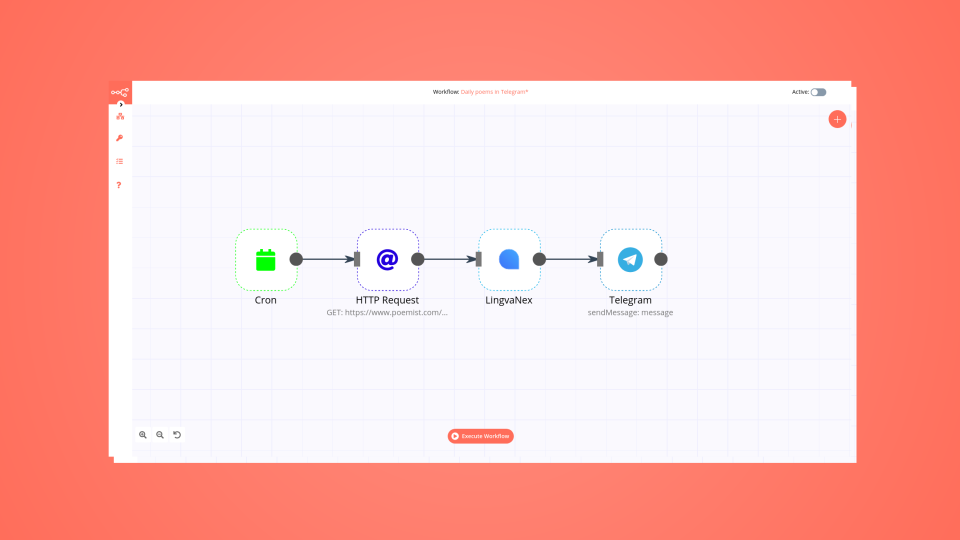
Learn how to create a no-code workflow that gets international poems, translates them into one language, and sends you a poem in Telegram every day.

Instead of using IFTTT or Zapier, which can be pretty limiting on a free tier, I decided to try n8n, which is a fair-code licensed tool.
Yes, Google Drive can connect with Telegram using n8n.io. With n8n, you can create workflows that automate tasks and transfer data between Google Drive and Telegram. Configure nodes for Google Drive and Telegram in the n8n interface, specifying actions and triggers to set up their connection.
Yes, with n8n, you can programmatically interact with Google Drive’s API via pre-defined supported actions or raw HTTP requests. With the HTTP Request node, you create a REST API call. You need to understand basic API terminology and concepts.
Yes, with n8n, you can programmatically interact with Telegram’s API via pre-defined supported actions or raw HTTP requests. With the HTTP Request node, you create a REST API call. You need to understand basic API terminology and concepts.
Yes, it is safe to use n8n to integrate Google Drive and Telegram. n8n offers various features to ensure the safe handling of your data. These include encrypted data transfers, secure credential storage, RBAC functionality, and compliance with industry-standard security practices (SOC2 compliant). For hosted plans, data is stored within the EU on servers located in Frankfurt, Germany. You can also host it on your own infrastructure for added control.
Learn more about n8n’s security practices here.
To start integrating Google Drive and Telegram in n8n, you have different options depending on how you intend to use it:
Unlike other platforms that charge per operation, step, or task, n8n charges only for full workflow executions. This approach guarantees predictable costs and scalability, no matter the complexity or volume of your workflows.


Looking to integrate Google Drive and Telegram in your company?









Build complex workflows, really fast

Handle branching, merging and iteration easily.
Pause your workflow to wait for external events.
Your data is displayed alongside your settings, making edge cases easy to track down.
Use 1000+ workflow templates available from our core team and our community.
Copy and paste, easily import and export workflows.
Report a vulnerability
© 2024 n8n | All rights reserved.






