Review GitHub pull requests with AI and log results to PostgreSQL and Slack
Automatically detects new GitHub Pull Requests, analyzes changed code with AI, generates detailed review comments (quality, security, performance, best practices), posts suggestions back to the PR, stores results in a database, and sends notifications.
Good to Know
Triggers automatically on new/updated GitHub Pull Requests via webhook (or manual test)
Fetches only changed files/diffs — no need to clone full repo
Uses AI (Grok, OpenAI, Claude, Gemini, etc.) to provide intelligent, context-aware feedback
Covers multiple dimensions: code quality, bugs, security vulnerabilities, performance issues, maintainability, style/best practices
Posts formatted review comments directly on the GitHub PR (with severity levels, suggestions, code snippets)
Stores review history & scores in PostgreSQL (or other DB) for auditing, metrics, team dashboards
Sends real-time notifications (Slack, Discord, email, etc.) for high-severity findings
Saves developers hours on initial reviews and catches issues early
How It Works
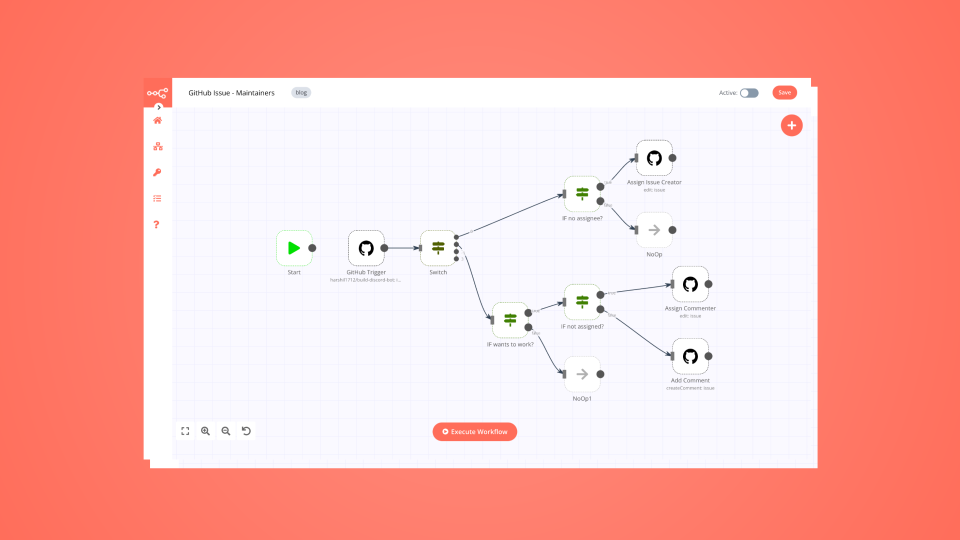
Trigger PR Detection
GitHub Webhook** node — listens for pull_request events (opened, synchronize, reopened, ready_for_review)
Optional: Filter node to ignore drafts, dependabot PRs, or specific branches
Manual trigger available for testing
Fetch & Analyze Code
GitHub** node — retrieves PR details (title, body, number, repo, base/head commits)
GitHub* or HTTP Request* — fetches list of changed files + diffs (using GitHub API /pulls/{number}/files and diff content)
Merge PR Details & Extract Diffs** — combines metadata + code changes into structured format
Prepares payload: file paths, diff hunks, full file content if needed (truncated for large files)
AI Review & Score
Sends prepared diff data + context (language, repo conventions, custom guidelines) to AI model
Prompt engineering focuses on:
Code correctness & bugs
Security vulnerabilities (OWASP, secrets, injection risks)
Performance optimizations
Readability, maintainability, SOLID principles
Best practices & style (specific to language/framework)
Refactoring suggestions with examples
AI returns structured output: severity (low/medium/high/critical), category, comment text, suggested fix (with code block)
Optional: Score node — assigns overall PR quality score (0–100) based on findings
Post Review & Notify
Route** by severity / issue count (e.g. critical → immediate Slack)
GitHub** node — posts detailed review comments on the PR (as bot user)
Supports threaded replies, line-specific comments (if hunk positions available)
Adds label e.g. ai-reviewed, needs-changes
Store Results in PostgreSQL** — logs full review (PR link, timestamp, AI output JSON, score, issues list)
Send Summary to Slack** (or Discord/Email/Telegram) — concise message with key findings, link to PR, severity highlights
Log Completion** — records successful execution for monitoring
Data Sources
GitHub** — Pull Requests, diffs, comments, labels (via webhook + API)
AI Model** — Grok (xAI), OpenAI GPT-4o / o1, Anthropic Claude, Google Gemini, or local LLM
Storage** — PostgreSQL (recommended for structured querying), or Supabase, Airtable, Google Sheets
Notifications** — Slack, Discord, Microsoft Teams, Email (SMTP), Telegram
How to Use
Import the workflow JSON into your n8n instance
Configure credentials:
GitHub OAuth / Personal Access Token (with repo scope)
AI provider API key (Grok/OpenAI/etc.)
PostgreSQL database connection
Slack/Discord/Email credentials
Set up GitHub Webhook:
In repo Settings → Webhooks → Add webhook
Payload URL = your n8n webhook URL
Content type: application/json
Events: Pull requests
Customize AI prompt — add repo-specific rules, coding standards, ignored patterns
Tune filters — minimum severity to post, files to skip (e.g. lock files, generated code)
Test — create/open a small PR or use Execute Workflow with sample payload
Activate — turn on the workflow and monitor Executions + Logs
Requirements
n8n (self-hosted preferred for webhooks)
GitHub repo with admin access to add webhook & bot token
AI API access with sufficient token limit (large PRs = large prompts)
PostgreSQL database (or alternative) for persistent storage
Notification service account (Slack app, Discord bot, etc.)
Customizing This Workflow
Add custom best practices** — load from Google Sheets/Notion/Airtable and inject into prompt
Support multi-file analysis** — chunk very large PRs or summarize per-file first
Auto-approve low-risk PRs** — add approval action if score > 90 and no critical issues
Security focus** — integrate with tools like Semgrep/Trivy results
Comment on specific lines** — use GitHub API position/hunk data for inline comments
Team routing** — notify language-specific experts via Slack channels
Metrics dashboard** — connect DB to Grafana/Metabase for review trends
Ignore patterns** — skip vendor/, node_modules/, tests/, etc.
Multiple AI models** — fallback or ensemble (e.g. Claude for reasoning + Grok for speed)