Back to Integrations
integrationGitHub node
integrationPostgres node

GitHub and Postgres integration

Save yourself the work of writing custom integrations for GitHub and Postgres and use n8n instead. Build adaptable and scalable Development, and Data & Storage workflows that work with your technology stack. All within a building experience you will love.

How to connect GitHub and Postgres

  • Step 1: Create a new workflow
  • Step 2: Add and configure nodes
  • Step 3: Connect
  • Step 4: Customize and extend your integration
  • Step 5: Test and activate your workflow

Step 1: Create a new workflow and add the first step

In n8n, click the "Add workflow" button in the Workflows tab to create a new workflow. Add the starting point – a trigger on when your workflow should run: an app event, a schedule, a webhook call, another workflow, an AI chat, or a manual trigger. Sometimes, the HTTP Request node might already serve as your starting point.

GitHub and Postgres integration: Create a new workflow and add the first step

Step 2: Add and configure GitHub and Postgres nodes

You can find GitHub and Postgres in the nodes panel. Drag them onto your workflow canvas, selecting their actions. Click each node, choose a credential, and authenticate to grant n8n access. Configure GitHub and Postgres nodes one by one: input data on the left, parameters in the middle, and output data on the right.

GitHub and Postgres integration: Add and configure GitHub and Postgres nodes

Step 3: Connect GitHub and Postgres

A connection establishes a link between GitHub and Postgres (or vice versa) to route data through the workflow. Data flows from the output of one node to the input of another. You can have single or multiple connections for each node.

GitHub and Postgres integration: Connect GitHub and Postgres

Step 4: Customize and extend your GitHub and Postgres integration

Use n8n's core nodes such as If, Split Out, Merge, and others to transform and manipulate data. Write custom JavaScript or Python in the Code node and run it as a step in your workflow. Connect GitHub and Postgres with any of n8n’s 1000+ integrations, and incorporate advanced AI logic into your workflows.

GitHub and Postgres integration: Customize and extend your GitHub and Postgres integration

Step 5: Test and activate your GitHub and Postgres workflow

Save and run the workflow to see if everything works as expected. Based on your configuration, data should flow from GitHub to Postgres or vice versa. Easily debug your workflow: you can check past executions to isolate and fix the mistake. Once you've tested everything, make sure to save your workflow and activate it.

GitHub and Postgres integration: Test and activate your GitHub and Postgres workflow

Pyragogy AI-driven handbook generator with multi-agent orchestration

AI-Driven Handbook Generator with Multi-Agent Orchestration (Pyragogy AI Village)

This n8n workflow is a modular, multi-agent AI orchestration system designed for the collaborative generation of Markdown-based handbooks. Inspired by peer learning and open publishing workflows, it simulates a content pipeline where specialized AI agents act in defined roles, enabling true AI–human co-creation and iterative refinement.

This project is a core component of Pyragogy, an open framework dedicated to ethical cognitive co-creation, peer AI–human learning, and human-in-the-loop automation for open knowledge systems. It implements the master orchestration architecture for the Pyragogy AI Village, managing a complex sequence of AI agents to process input, perform review, synthesis, and archiving, with a crucial human oversight step for final approval.

How It Works: A Deep Dive into the Workflow's Architecture

The workflow orchestrates a sophisticated content generation and review process, ideal for creating AI-driven knowledge bases or handbooks with human oversight.

Webhook Trigger & Input:* The process begins when the workflow receives a JSON input via a Webhook* (specifically at /webhook/pyragogy/process). This input typically includes details like the handbook's title, initial text, and relevant tags.

Database Verification:* It first verifies the connection to a PostgreSQL database* to ensure data persistence.

Meta-Orchestrator:* A powerful Meta-Orchestrator* (powered by gpt-4o from OpenAI) analyzes the initial request. Its role is to dynamically determine and activate the optimal sequence of specialized AI agents required to fulfill the input, ensuring tasks are dynamically routed and assigned based on each agent’s responsibility.

Agent Execution & Iteration:** Each activated agent executes its step using OpenAI or custom endpoints. This involves:

Content Generation: Agents like the Summarizer and the Synthesizer generate new content or refine existing text.

Peer Review Board: A crucial aspect is the Peer Review Board, comprised of AI agents like the Peer Reviewer, the Sensemaking Agent, and the Prompt Engineer. This board evaluates the output for quality, coherence, and accuracy.

Reprocessing & Redrafting: If the review agents flag a major_issue, they trigger redrafting loops by generating specific feedback for the Synthesizer. This mechanism ensures iterative refinement until the content meets the required standards.

Human-in-the-Loop (HITL) Review:* For final approval, particularly for the Archivist agent's output, a human review process is initiated. An email is sent to a human reviewer, prompting them to approve, reject, or comment via a "Wait for Webhook" node. This ensures human oversight* and quality control.

Content Persistence & Versioning:** If the content is approved by the human reviewer:

It's saved to a PostgreSQL database (specifically to the handbook_entries and agent_contributions tables).

Optionally, the content can be committed to a GitHub repository for version control, provided the necessary environment variables are configured.

Notifications:* The final output and the sequence of executed agents can be sent as a notification to Slack*, if configured.

Observe the dynamic loop: orchestrate → assign → generate → review (AI/human) → store

Included AI Agents

This workflow leverages a suite of specialized AI agents, each with a distinct role in the content pipeline:

Meta-Orchestrator:** Determines the optimal sequence of agents to execute based on the input.

Summarizer Agent:** Summarizes text into key points (e.g., 3 key points).

Synthesizer Agent:** Synthesizes new text and effectively incorporates reprocessing feedback from review agents.

Peer Reviewer Agent:** Reviews generated text, highlighting strengths, weaknesses, and suggestions, and indicates major_issue flags.

Sensemaking Agent:** Analyzes input within existing context, identifying patterns, gaps, and areas for improvement.

Prompt Engineer Agent:** Refines or generates prompts for subsequent agents, optimizing their output.

Onboarding/Explainer Agent:** Provides explanations of the process or offers guidance to users.

Archivist Agent:** Prepares content for the handbook, manages the human review process, and handles archiving to the database and GitHub.

Setup Steps & Prerequisites

To get this powerful workflow up and running, follow these steps:

Import the Workflow: Import the pyragogy_master_workflow.json (or generate-collaborative-handbooks-with-gpt4o-multi-agent-orchestration-human-review.json) into your n8n instance.

Connect Credentials:

Postgres: Set up a Postgres Pyragogy DB credential (ID: pyragogy-postgres).

OpenAI: Configure an OpenAI Pyragogy credential (ID: pyragogy-openai) for all OpenAI agents. GPT-4o is highly suggested for optimal performance.

Email Send: Set up a configured email credential (e.g., for sending human review requests).

Define Environment Variables: Define essential environment variables (an .env.template is included in the repository). These include:

API base for OpenAI.

Database connection details.

(Optional) GitHub: For content persistence and versioning, configure GITHUB_ACCESS_TOKEN, GITHUB_REPOSITORY_OWNER, and GITHUB_REPOSITORY_NAME.

(Optional) Slack: For notifications, configure SLACK_WEBHOOK_URL.

Send a sample payload to your webhook URL (/webhook/pyragogy/process):

{
"title": "History of Peer Learning",
"text": "Peer learning is an educational approach where students learn from and with each other...",
"tags": ["education", "pedagogy"],
"requireHitl": true
}

Ideal For

This workflow is perfectly suited for:

Educators and researchers exploring AI-assisted publishing and co-authoring with AI.

Knowledge teams looking to automate content pipelines for internal or external documentation.

Anyone building collaborative Markdown-driven tools or AI-powered knowledge bases.

Documentation & Contributions: An Open Source and Collaborative Project

This workflow is an open-source project and community-driven. Its development is transparent and open to everyone.

We warmly invite you to:

Review it:** Contribute your analysis, identify potential improvements, or report issues.

Remix it:** Adapt it to your specific needs, integrate new features, or modify it for a different use case.

Improve it:** Propose and implement changes that enhance its efficiency, robustness, or capabilities.

Share it back:** Return your contributions to the community, either through pull requests or by sharing your implementations.

Every contribution is welcome and valued! All relevant information for verification, improvement, and collaboration can be found in the official repository:

🔗 GitHub – pyragogy-handbook-n8n-workflow

Nodes used in this workflow

Popular GitHub and Postgres workflows

Pyragogy AI-Driven Handbook Generator with Multi-Agent Orchestration

AI-Driven Handbook Generator with Multi-Agent Orchestration (Pyragogy AI Village) This n8n workflow is a modular, multi-agent AI orchestration system designed for the collaborative generation of Markdown-based handbooks. Inspired by peer learning and open publishing workflows, it simulates a content pipeline where specialized AI agents act in defined roles, enabling true AI–human co-creation and iterative refinement. This project is a core component of Pyragogy, an open framework dedicated to ethical cognitive co-creation, peer AI–human learning, and human-in-the-loop automation for open knowledge systems. It implements the master orchestration architecture for the Pyragogy AI Village, managing a complex sequence of AI agents to process input, perform review, synthesis, and archiving, with a crucial human oversight step for final approval. How It Works: A Deep Dive into the Workflow's Architecture The workflow orchestrates a sophisticated content generation and review process, ideal for creating AI-driven knowledge bases or handbooks with human oversight. Webhook Trigger & Input:* The process begins when the workflow receives a JSON input via a Webhook* (specifically at /webhook/pyragogy/process). This input typically includes details like the handbook's title, initial text, and relevant tags. Database Verification:* It first verifies the connection to a PostgreSQL database* to ensure data persistence. Meta-Orchestrator:* A powerful Meta-Orchestrator* (powered by gpt-4o from OpenAI) analyzes the initial request. Its role is to dynamically determine and activate the optimal sequence of specialized AI agents required to fulfill the input, ensuring tasks are dynamically routed and assigned based on each agent’s responsibility. Agent Execution & Iteration:** Each activated agent executes its step using OpenAI or custom endpoints. This involves: Content Generation: Agents like the Summarizer and the Synthesizer generate new content or refine existing text. Peer Review Board: A crucial aspect is the Peer Review Board, comprised of AI agents like the Peer Reviewer, the Sensemaking Agent, and the Prompt Engineer. This board evaluates the output for quality, coherence, and accuracy. Reprocessing & Redrafting: If the review agents flag a major_issue, they trigger redrafting loops by generating specific feedback for the Synthesizer. This mechanism ensures iterative refinement until the content meets the required standards. Human-in-the-Loop (HITL) Review:* For final approval, particularly for the Archivist agent's output, a human review process is initiated. An email is sent to a human reviewer, prompting them to approve, reject, or comment via a "Wait for Webhook" node. This ensures human oversight* and quality control. Content Persistence & Versioning:** If the content is approved by the human reviewer: It's saved to a PostgreSQL database (specifically to the handbook_entries and agent_contributions tables). Optionally, the content can be committed to a GitHub repository for version control, provided the necessary environment variables are configured. Notifications:* The final output and the sequence of executed agents can be sent as a notification to Slack*, if configured. Observe the dynamic loop: orchestrate → assign → generate → review (AI/human) → store Included AI Agents This workflow leverages a suite of specialized AI agents, each with a distinct role in the content pipeline: Meta-Orchestrator:** Determines the optimal sequence of agents to execute based on the input. Summarizer Agent:** Summarizes text into key points (e.g., 3 key points). Synthesizer Agent:** Synthesizes new text and effectively incorporates reprocessing feedback from review agents. Peer Reviewer Agent:** Reviews generated text, highlighting strengths, weaknesses, and suggestions, and indicates major_issue flags. Sensemaking Agent:** Analyzes input within existing context, identifying patterns, gaps, and areas for improvement. Prompt Engineer Agent:** Refines or generates prompts for subsequent agents, optimizing their output. Onboarding/Explainer Agent:** Provides explanations of the process or offers guidance to users. Archivist Agent:** Prepares content for the handbook, manages the human review process, and handles archiving to the database and GitHub. Setup Steps & Prerequisites To get this powerful workflow up and running, follow these steps: Import the Workflow: Import the pyragogy_master_workflow.json (or generate-collaborative-handbooks-with-gpt4o-multi-agent-orchestration-human-review.json) into your n8n instance. Connect Credentials: Postgres: Set up a Postgres Pyragogy DB credential (ID: pyragogy-postgres). OpenAI: Configure an OpenAI Pyragogy credential (ID: pyragogy-openai) for all OpenAI agents. GPT-4o is highly suggested for optimal performance. Email Send: Set up a configured email credential (e.g., for sending human review requests). Define Environment Variables: Define essential environment variables (an .env.template is included in the repository). These include: API base for OpenAI. Database connection details. (Optional) GitHub: For content persistence and versioning, configure GITHUB_ACCESS_TOKEN, GITHUB_REPOSITORY_OWNER, and GITHUB_REPOSITORY_NAME. (Optional) Slack: For notifications, configure SLACK_WEBHOOK_URL. Send a sample payload to your webhook URL (/webhook/pyragogy/process): { "title": "History of Peer Learning", "text": "Peer learning is an educational approach where students learn from and with each other...", "tags": ["education", "pedagogy"], "requireHitl": true } Ideal For This workflow is perfectly suited for: Educators and researchers exploring AI-assisted publishing and co-authoring with AI. Knowledge teams looking to automate content pipelines for internal or external documentation. Anyone building collaborative Markdown-driven tools or AI-powered knowledge bases. Documentation & Contributions: An Open Source and Collaborative Project This workflow is an open-source project and community-driven. Its development is transparent and open to everyone. We warmly invite you to: Review it:** Contribute your analysis, identify potential improvements, or report issues. Remix it:** Adapt it to your specific needs, integrate new features, or modify it for a different use case. Improve it:** Propose and implement changes that enhance its efficiency, robustness, or capabilities. Share it back:** Return your contributions to the community, either through pull requests or by sharing your implementations. Every contribution is welcome and valued! All relevant information for verification, improvement, and collaboration can be found in the official repository: 🔗 GitHub – pyragogy-handbook-n8n-workflow

Review GitHub pull requests with AI and log results to PostgreSQL and Slack

Automatically detects new GitHub Pull Requests, analyzes changed code with AI, generates detailed review comments (quality, security, performance, best practices), posts suggestions back to the PR, stores results in a database, and sends notifications. Good to Know Triggers automatically on new/updated GitHub Pull Requests via webhook (or manual test) Fetches only changed files/diffs — no need to clone full repo Uses AI (Grok, OpenAI, Claude, Gemini, etc.) to provide intelligent, context-aware feedback Covers multiple dimensions: code quality, bugs, security vulnerabilities, performance issues, maintainability, style/best practices Posts formatted review comments directly on the GitHub PR (with severity levels, suggestions, code snippets) Stores review history & scores in PostgreSQL (or other DB) for auditing, metrics, team dashboards Sends real-time notifications (Slack, Discord, email, etc.) for high-severity findings Saves developers hours on initial reviews and catches issues early How It Works Trigger PR Detection GitHub Webhook** node — listens for pull_request events (opened, synchronize, reopened, ready_for_review) Optional: Filter node to ignore drafts, dependabot PRs, or specific branches Manual trigger available for testing Fetch & Analyze Code GitHub** node — retrieves PR details (title, body, number, repo, base/head commits) GitHub* or HTTP Request* — fetches list of changed files + diffs (using GitHub API /pulls/{number}/files and diff content) Merge PR Details & Extract Diffs** — combines metadata + code changes into structured format Prepares payload: file paths, diff hunks, full file content if needed (truncated for large files) AI Review & Score Sends prepared diff data + context (language, repo conventions, custom guidelines) to AI model Prompt engineering focuses on: Code correctness & bugs Security vulnerabilities (OWASP, secrets, injection risks) Performance optimizations Readability, maintainability, SOLID principles Best practices & style (specific to language/framework) Refactoring suggestions with examples AI returns structured output: severity (low/medium/high/critical), category, comment text, suggested fix (with code block) Optional: Score node — assigns overall PR quality score (0–100) based on findings Post Review & Notify Route** by severity / issue count (e.g. critical → immediate Slack) GitHub** node — posts detailed review comments on the PR (as bot user) Supports threaded replies, line-specific comments (if hunk positions available) Adds label e.g. ai-reviewed, needs-changes Store Results in PostgreSQL** — logs full review (PR link, timestamp, AI output JSON, score, issues list) Send Summary to Slack** (or Discord/Email/Telegram) — concise message with key findings, link to PR, severity highlights Log Completion** — records successful execution for monitoring Data Sources GitHub** — Pull Requests, diffs, comments, labels (via webhook + API) AI Model** — Grok (xAI), OpenAI GPT-4o / o1, Anthropic Claude, Google Gemini, or local LLM Storage** — PostgreSQL (recommended for structured querying), or Supabase, Airtable, Google Sheets Notifications** — Slack, Discord, Microsoft Teams, Email (SMTP), Telegram How to Use Import the workflow JSON into your n8n instance Configure credentials: GitHub OAuth / Personal Access Token (with repo scope) AI provider API key (Grok/OpenAI/etc.) PostgreSQL database connection Slack/Discord/Email credentials Set up GitHub Webhook: In repo Settings → Webhooks → Add webhook Payload URL = your n8n webhook URL Content type: application/json Events: Pull requests Customize AI prompt — add repo-specific rules, coding standards, ignored patterns Tune filters — minimum severity to post, files to skip (e.g. lock files, generated code) Test — create/open a small PR or use Execute Workflow with sample payload Activate — turn on the workflow and monitor Executions + Logs Requirements n8n (self-hosted preferred for webhooks) GitHub repo with admin access to add webhook & bot token AI API access with sufficient token limit (large PRs = large prompts) PostgreSQL database (or alternative) for persistent storage Notification service account (Slack app, Discord bot, etc.) Customizing This Workflow Add custom best practices** — load from Google Sheets/Notion/Airtable and inject into prompt Support multi-file analysis** — chunk very large PRs or summarize per-file first Auto-approve low-risk PRs** — add approval action if score > 90 and no critical issues Security focus** — integrate with tools like Semgrep/Trivy results Comment on specific lines** — use GitHub API position/hunk data for inline comments Team routing** — notify language-specific experts via Slack channels Metrics dashboard** — connect DB to Grafana/Metabase for review trends Ignore patterns** — skip vendor/, node_modules/, tests/, etc. Multiple AI models** — fallback or ensemble (e.g. Claude for reasoning + Grok for speed)

+8

Creating SEO-Optimized Blogs for WordPress Using Specific Tools

✍️ AI-Powered High-Quality Blog Automation Automate SEO-optimized blog creation, publishing, and internal linking — designed for Lovable.dev or seamless WordPress integration. Proven to boost impressions by +15% weekly on real websites. 📌 Example: AI Applications in Real Estate Playbook — fully generated, optimized, and published with this automation. 🚀 What This Workflow Does Bring Your Own Keywords** You provide the keyword list — the workflow applies a scoring formula to rank them by relevance and competition for maximum SEO impact. Keyword Scoring & Logging** Scores primary and secondary keywords, logs them in PostgreSQL, and prevents reuse until strategically relevant. Deep Research & Blog Planning** Uses Perplexity AI and other AI models to outline, plan, and enrich each article with authoritative external sources. SEO-Optimized Redaction** Writes multi-part, long-form blogs with integrated internal links (to your existing content) and external links to reputable sites. Image Generation & Selection** Creates or selects high-quality header and in-article images, optimized for your topic. Full Blog Infrastructure** Internal & external linking logic Blog card + metadata updates Sitemap updates & Google indexing submission Post logging for future reference Publishing Flexibility** Direct GitHub commits for Lovable.dev WordPress-ready export Optional Slack approval before publishing 🔗 Integrated Services PostgreSQL** – Keyword & content database Perplexity AI** – Research & planning OpenAI / OpenRouter Models** – Multi-part blog writing Lovable.dev / GitHub** – Direct publishing WordPress-ready JSON output** – Easy CMS import Slack** – Approval workflow before going live 💼 What You Get Detailed Setup Guide** Workflow Description** 📥 Perfect For Website owners wanting consistent SEO growth Agencies handling multiple client sites Marketers running content-heavy campaigns Lovable.dev or WordPress users who want hands-off publishing 💡 Why You’ll Love It This is more than a blog writer — it’s a complete content infrastructure. From keyword prioritization to publishing and indexing, it keeps your site growing in reach and authority while you focus on your business.




Daily Postgres Table Backup to GitHub in CSV Format

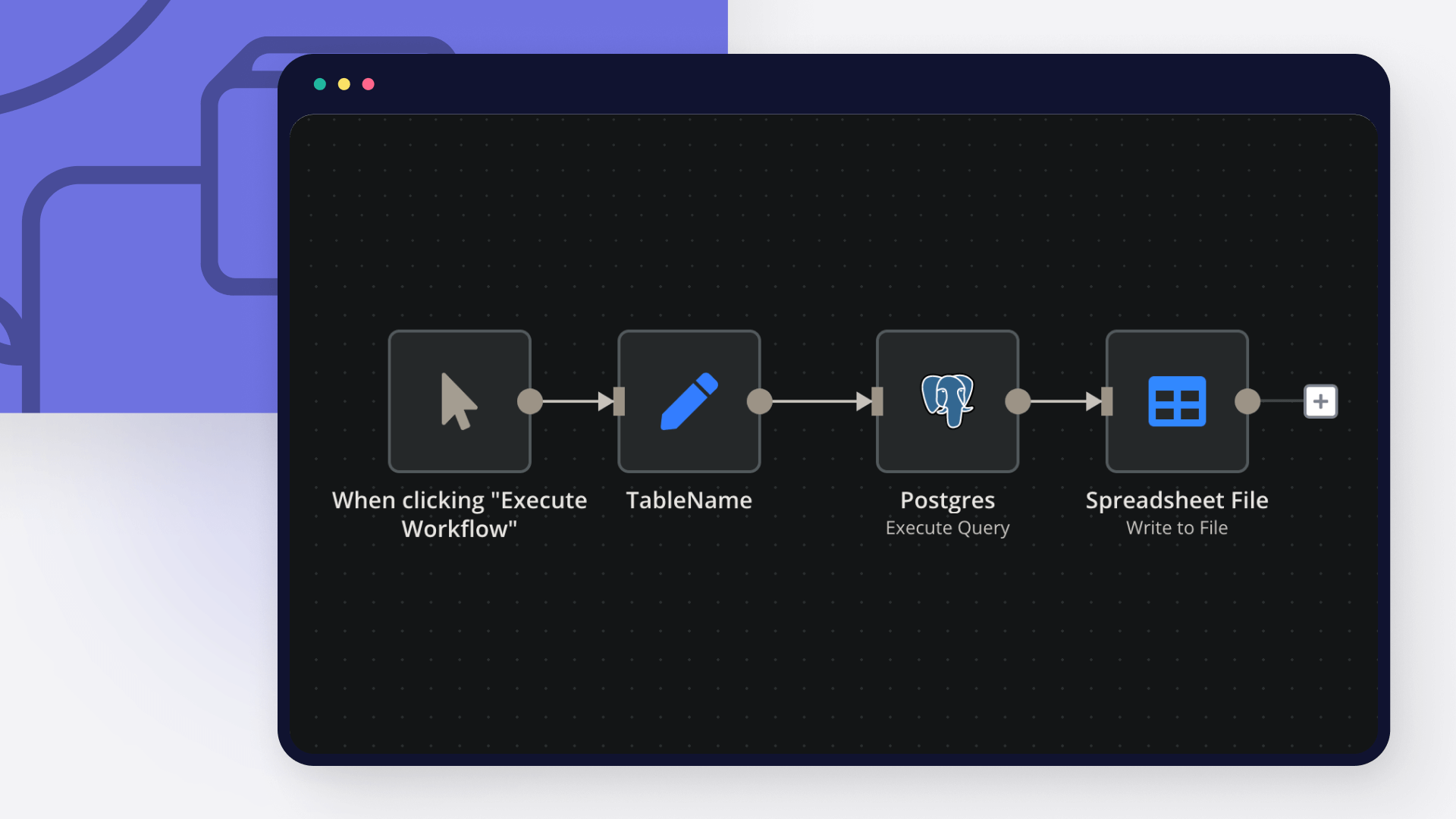
This workflow automatically backs up all public Postgres tables into a GitHub repository as CSV files every 24 hours. It ensures your database snapshots are always up to date updating existing files if data changes, or creating new backups for new tables. How it works: Schedule Trigger – Runs daily to start the backup process. GitHub Integration – Lists existing files in the target repo to avoid duplicates. Postgres Query – Fetches all table names from the public schema. Data Extraction – Selects all rows from each table. Convert to CSV – Saves table data as CSV files. Conditional Upload – If the table already exists in GitHub → Update the file. If new → Upload a new file. Postgres Tables Preview GitHub Backup Preview Use case: Perfect for developers, analysts, or data engineers who want daily automated backups of Postgres data without manual exports keeping both history and version control in GitHub. Requirements: Postgres credentials with read access. GitHub repository (OAuth2 connected in n8n).

Build your own GitHub and Postgres integration

Create custom GitHub and Postgres workflows by choosing triggers and actions. Nodes come with global operations and settings, as well as app-specific parameters that can be configured. You can also use the HTTP Request node to query data from any app or service with a REST API.

GitHub supported actions

Create
Create a new file in repository
Delete
Delete a file in repository
Edit
Edit a file in repository
Get
Get the data of a single file
List
List contents of a folder
Create
Create a new issue
Create Comment
Create a new comment on an issue
Edit
Edit an issue
Get
Get the data of a single issue
Lock
Lock an issue
Get Repositories
Returns all repositories of an organization
Create
Creates a new release
Delete
Delete a release
Get
Get a release
Get Many
Get many repository releases
Update
Update a release
Get
Get the data of a single repository
Get Issues
Returns issues of a repository
Get License
Returns the contents of the repository's license file, if one is detected
Get Profile
Get the community profile of a repository with metrics, health score, description, license, etc
Get Pull Requests
Returns pull requests of a repository
List Popular Paths
Get the top 10 popular content paths over the last 14 days
List Referrers
Get the top 10 referrering domains over the last 14 days
Create
Creates a new review
Get
Get a review for a pull request
Get Many
Get many reviews for a pull request
Update
Update a review
Get Repositories
Returns the repositories of a user
Get Issues
Returns the issues assigned to the user
Invite
Invites a user to an organization
Disable
Disable a workflow
Dispatch
Dispatch a workflow event
Dispatch and Wait for Completion
Dispatch a workflow event and wait for a webhook to be called before proceeding
Enable
Enable a workflow
Get
Get a workflow
Get Usage
Get the usage of a workflow
List
List workflows

Postgres supported actions

Delete
Delete an entire table or rows in a table
Execute Query
Execute an SQL query
Insert
Insert rows in a table
Insert or Update
Insert or update rows in a table
Select
Select rows from a table
Update
Update rows in a table

GitHub and Postgres integration tutorials

featured image

How to push code to GitHub: 3 techniques

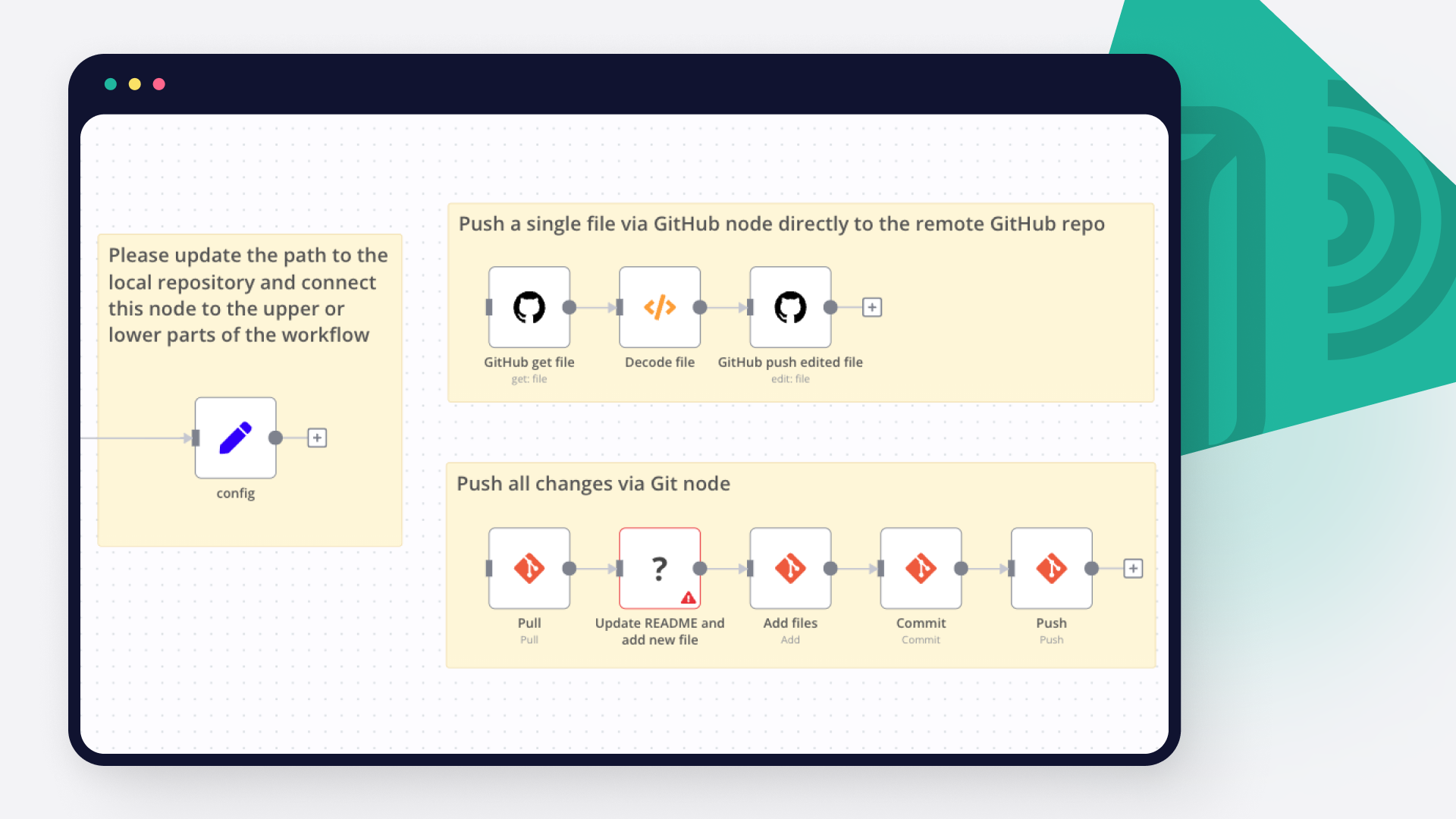
Learn how to seamlessly push code into GitHub with these 3 techniques: GitHub command line; GitHub n8n node for remote repositories, n8n Git node for local repos. And grab free n8n workflows for a quick start with GitHub automations!

featured image

How to export data from PostgreSQL to CSV

CSV is a universally accepted and easy-to-read format to interpret data, and PostgreSQL is one of the most popular relational databases. Read on to learn how to export PostgreSQL as a CSV file using the COPY command, \copy command, and n8n.

featured image

How to import CSV into PostgreSQL

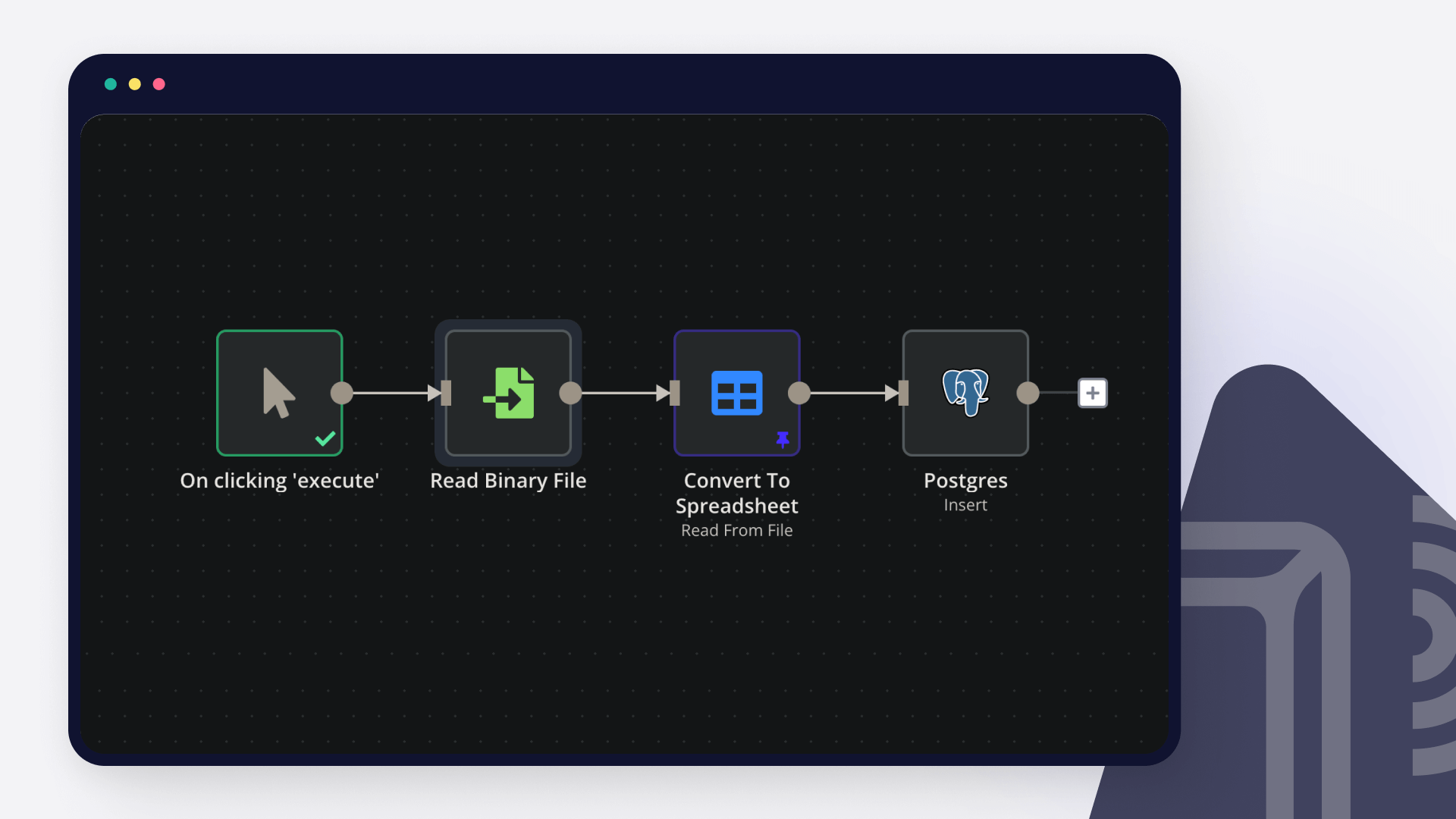
PostgreSQL remains one of the most popular relational database options among data enthusiasts. Read on to learn how to import a CSV file into PostgreSQL using pgAdmin, SQL statements, and n8n.

featured image

Database activity monitoring: How to automatically monitor and set alerts for a database

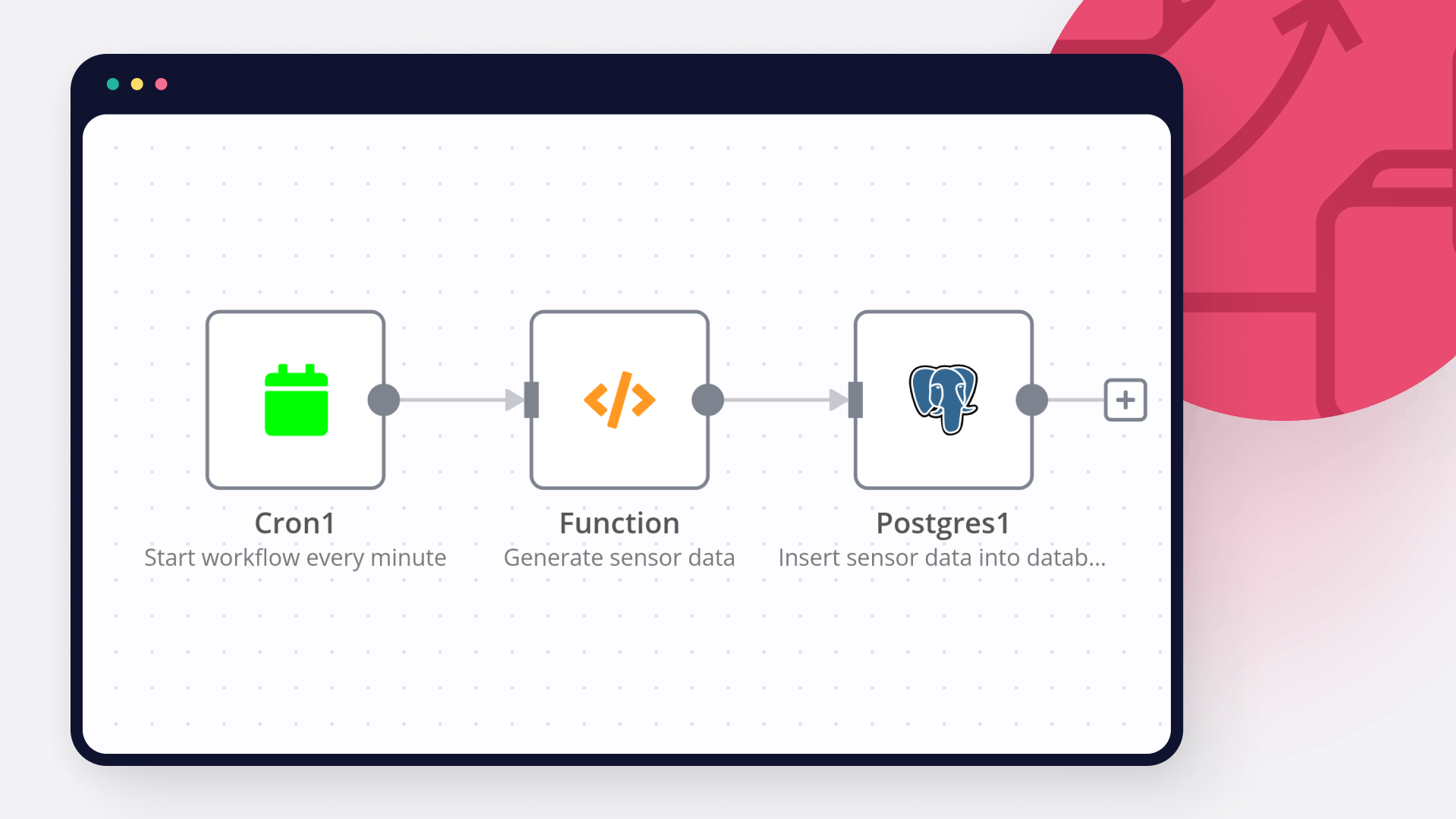
Learn what database activity monitoring is, why it's important, and how to automatically monitor a Postgres database containing IoT data with n8n workflows.

featured image

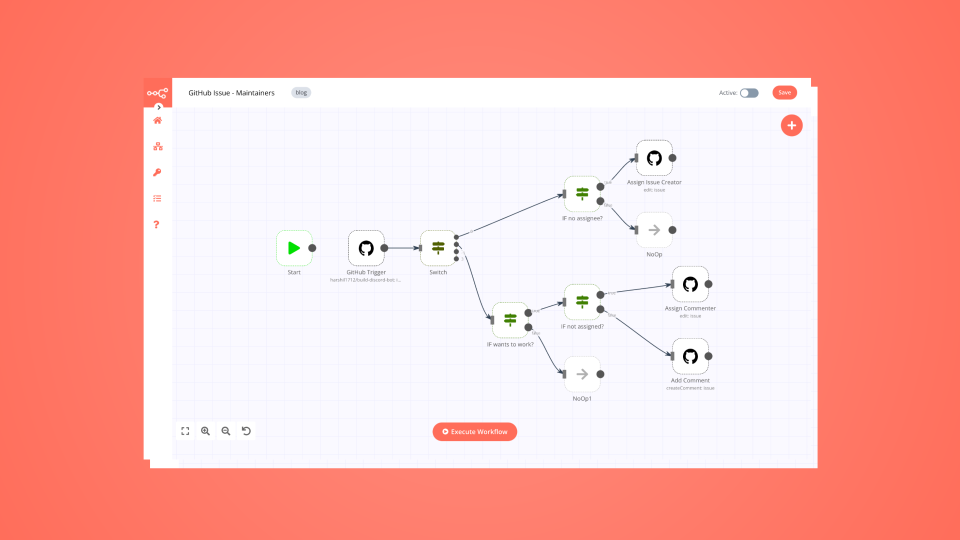
How to automatically manage contributions to open-source projects

Maintainers, this one’s for you: simplify your work by building a no-code workflow that assigns GitHub issues to contributors.

featured image

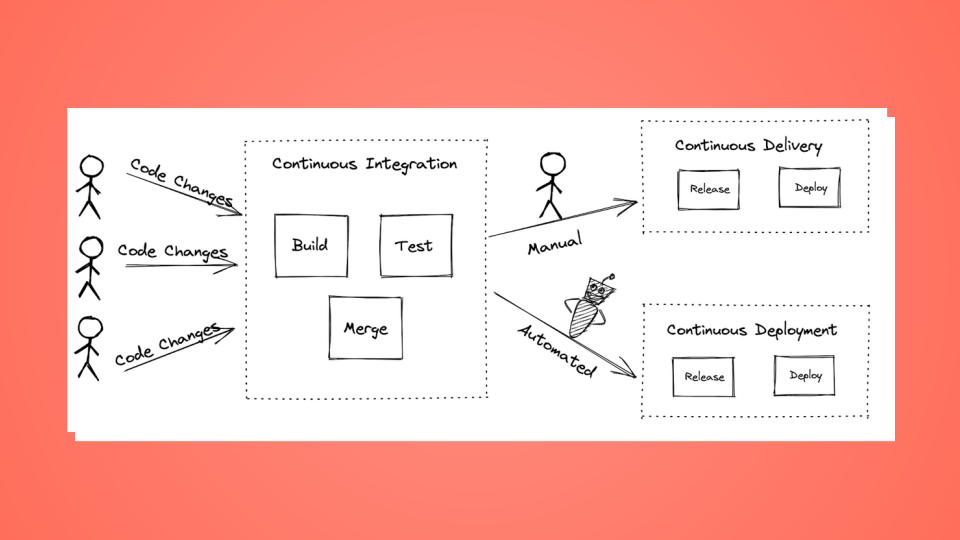
How to set up a no-code CI/CD pipeline with GitHub and TravisCI

Learn how Continuous Integration, Continuous Delivery, and Continuous Development work, and how you can set up a CI/CD pipeline.

FAQs

  • Can GitHub connect with Postgres?

  • Can I use GitHub’s API with n8n?

  • Can I use Postgres’s API with n8n?

  • Is n8n secure for integrating GitHub and Postgres?

  • How to get started with GitHub and Postgres integration in n8n.io?

Need help setting up your GitHub and Postgres integration?

Discover our latest community's recommendations and join the discussions about GitHub and Postgres integration.
Mikhail Savenkov
Honza Pav
Vyacheslav Karbovnichy
Dennis
Dennis

Looking to integrate GitHub and Postgres in your company?

Over 3000 companies switch to n8n every single week

Why use n8n to integrate GitHub with Postgres

Build complex workflows, really fast

Build complex workflows, really fast

Handle branching, merging and iteration easily.
Pause your workflow to wait for external events.

Code when you need it, UI when you don't

Simple debugging

Your data is displayed alongside your settings, making edge cases easy to track down.

Use templates to get started fast

Use 1000+ workflow templates available from our core team and our community.

Reuse your work

Copy and paste, easily import and export workflows.

Implement complex processes faster with n8n

red iconyellow iconred iconyellow icon